MCU pinout viewer
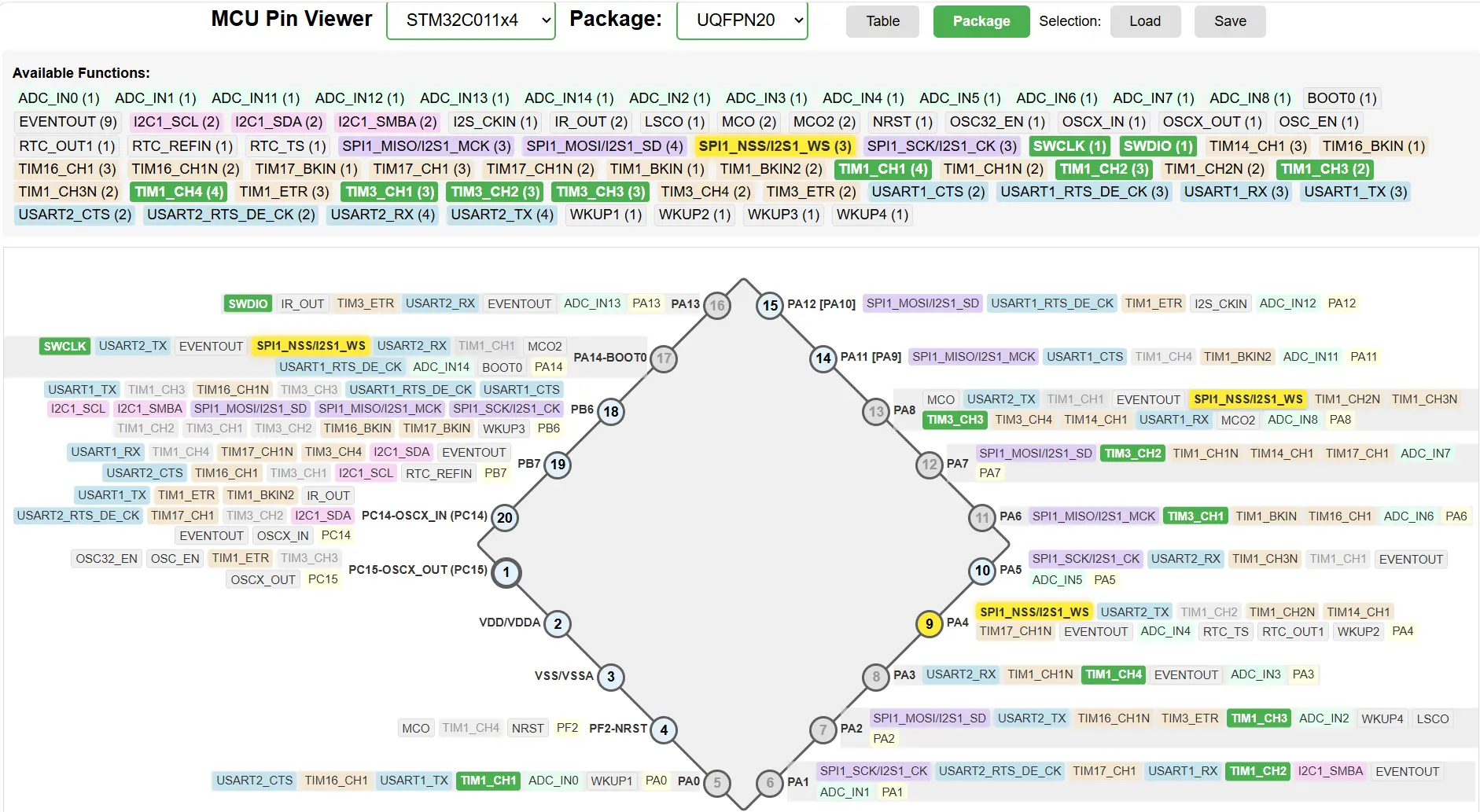
To use some specific functions of the MCU, like PWM, ADC or I2C, you need to configure pins in a specific way. A lot of MCUs only allow some functions on some pins, and very often choosing functions if far from trivial and very tedious.
I’ve stumbled upon this when using PY32F003. I needed to enable as many PWM pins as possible in the smallest package, so I had to juggle pin functions around and try different configurations a lot. In the end I developed the tool to simplify this. It allows you to bind functions to MCU pins while keeping an eye on what functions will be blocked by what choice. It is inspired by STM32CubeMX tool, and the main usecase is for STM32-like MCUs.
It’s a static webpage that doesn’t need installation and doesn’t send anything to cloud.
Since I’m not a web developer, the tool is mostly vibecoded. I reviewed the code and cleaned up the ugliest messes, but it’s probably not the codebase to use in a classroom.
There are 2 views, table and package view. Package view tries to determine the shape of the chip and draws pins around the shape.
You can click on a function to bind the function to the pin. The pin will then change the color, as will the function. Hovering over the function will highlight other pins that can output the same function.
|
I only tested it on quad and dual-in-line packages like QFN and TSSOP. Package view definitely does not support grid array packages like BGA or WLCSP. |
To work, it must have information about the MCU. 2 MCUs are built-in, PY32F003 and STM32C011. For the rest, a JSON file must be loaded into the app.
The JSON file must contain pin definitions for the MCU, which I extract from MCU’s datasheet pinout table.
It must have fields
-
name(string), -
packages(array of strings) -
pins(array of objects). Each pin must contain fields-
pinNumbers(array of pin numbers, same order as packages) -
name(string) -
functions(array of strings) -
portType, if present, helps determining pin type (power/analog/)
-
For example, this is how STM32C0 pin table looks like. I copied it from PDF, it spans 2 pages, so I had to glue it in Paint, then asked AI to convert into JSON using a JSON template. Manual cleaning and checking is required afterwards.
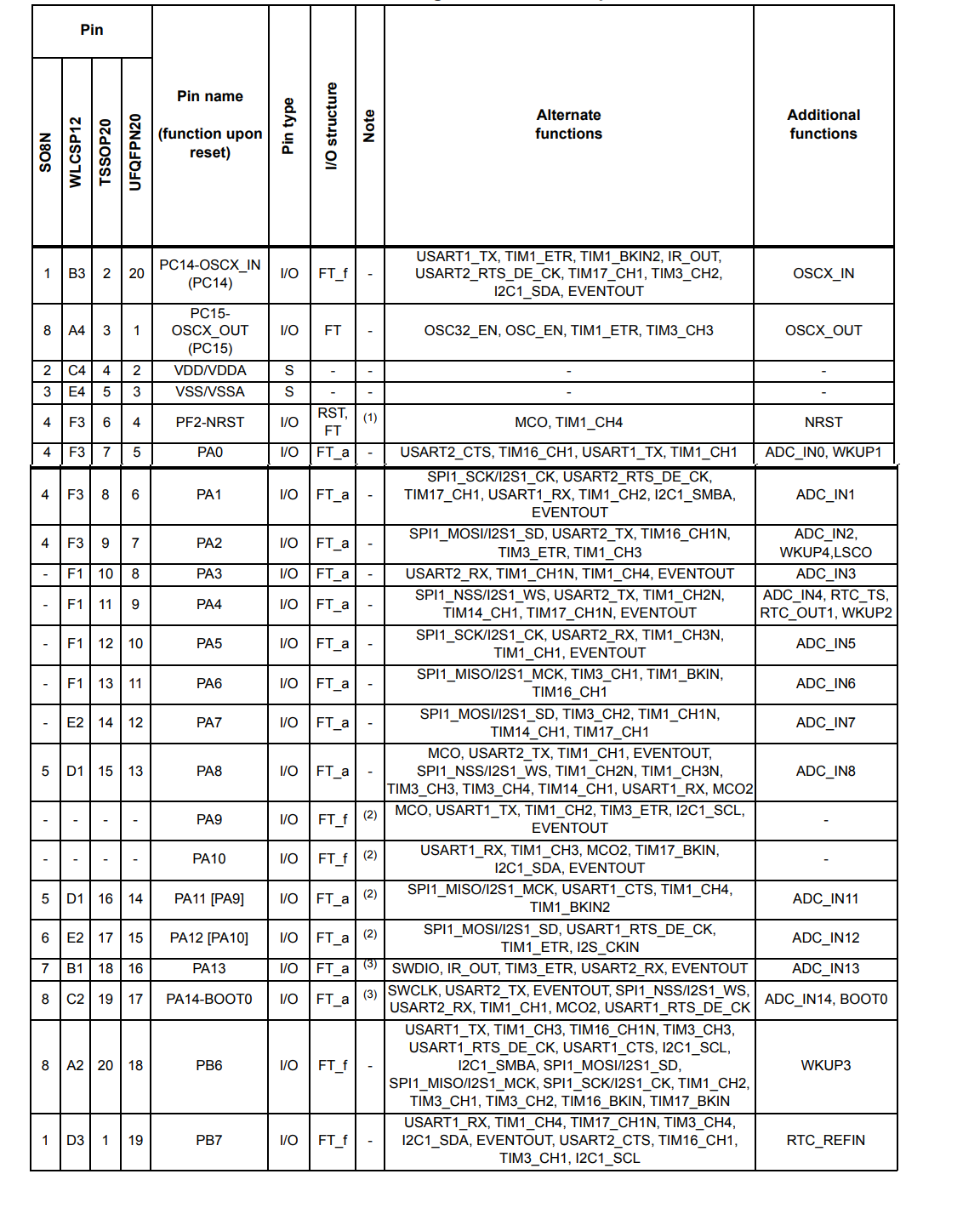
It produces the following pin definition (1st one):
{
  "name": "STM32C011x4",
  "packages": [ "SO8N", "WLCSP12", "TSSOP20", "UQFPN20" ],
  "pins": [
    {
      "pinNumbers": [ 1, "B3", 2, 20 ],
      "name": "PC14-OSCX_IN (PC14)",
      "portType": "I/O",
      "portStructure": "FT_f",
      "functions": [
        "USART1_TX", "TIM1_ETR", "TIM1_BKIN2", "IR_OUT",
        "USART2_RTS_DE_CK", "TIM17_CH1", "TIM3_CH2",
        "I2C1_SDA", "EVENTOUT", "OSCX_IN"
      ]
    },
  ...